

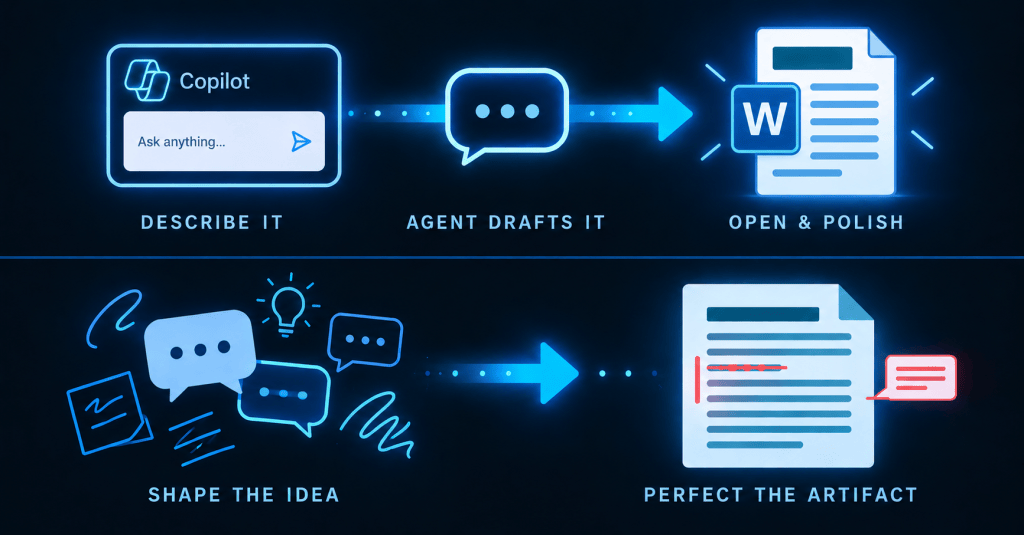
Bottom line up front
Use the Word Agent in chat to shape structure and ideas, then move to Word itself for precision editing — tracked changes, styles, tables. Both stages require a paid Microsoft 365 Copilot license, and the Word Agent specifically needs your tenant admin to have enabled Anthropic’s models.
The last post covered the Word Agent: describe a document in plain language and get a real, saved draft back. That’s half a workflow. This one covers the other half — what to do once that draft exists, and why finishing it in Word instead of in chat isn’t a downgrade, it’s the point.
Why It Matters
There’s a natural rhythm to creating documents with Copilot that most people fall into by accident: start in chat, finish in the app. It’s worth making deliberate, because the two surfaces are built for different parts of the job, and using the wrong one for the wrong part is where the friction comes from.
What You’ll Learn
- Where chat is the right tool, and where it isn’t
- Where Word is the right tool, and why the handoff between them is direct
- The licensing reality for both stages of this workflow
- The one mistake that causes most of the friction people report
Where Chat Wins: Idea to Draft
The Word Agent lives under the Tools or Agents menu in Microsoft 365 Copilot Chat. Describe what you need in natural language, answer a clarifying question or two, and it produces a structured first draft, saved directly to your organization’s OneDrive. This is where ideation belongs — you’re deciding what the document is, its structure, its scope, its purpose, not fighting with formatting while you’re still figuring out the content.
Where the App Wins: Draft to Finished
Once the Word Agent hands off, open the file in Word and you’re in the tool built for precise editing: tracked changes, styles, tables, comments — the controls chat doesn’t have. The Word Agent and Copilot’s in-document editing features are both part of the same Copilot in Word experience, so what lands in Word is already a real, native document. You’re refining it, not rebuilding it in a different tool’s mental model.
The Licensing Reality
⚠️ Watch out
Both stages require a paid Microsoft 365 Copilot license, and the Word Agent specifically needs your tenant admin to have connected Anthropic’s models. Confirm both before rolling this workflow out to a team — not after someone hits a wall.
The Mistake to Avoid
The friction shows up when people try to do everything in one place: agonizing over structure inside Word, or trying to perfect formatting in chat. Neither surface is built for the other’s job. Chat is fast at generating structure and slow at precision formatting. Word is the reverse.
A Practical Scenario
A program manager needs a status report for three stakeholders with different levels of technical detail. She starts in the Word Agent: “Draft a one-page status report with sections for progress, risks, and next steps, written for a mixed technical and non-technical audience.” The agent returns a structured draft in her OneDrive. She opens it in Word and uses tracked changes to tighten the risks section, adjusts a table the agent generated, and adds a comment for a colleague to confirm one figure before it goes out. The idea-to-structure work happened in chat; the precision work happened in Word. Neither stage did the other’s job.
Best Practices and Common Pitfalls
Use the Word Agent for the messy front end: describing what you need, not formatting it. Move to Word as soon as the structure is right, rather than trying to perfect wording inside chat. Pay attention to which parts feel easier in chat and which feel easier in the app on your next document — that’s your signal for where each step belongs. And don’t forget the license check: this entire workflow assumes a paid Copilot license and an admin who’s enabled Anthropic models for your tenant.
Key Takeaways
Chat is for shaping the idea. Word is for perfecting the artifact. Both stages of this workflow require the same Microsoft 365 Copilot license, and the Word Agent specifically depends on your tenant having Anthropic’s models enabled. Using each surface for its strength, rather than forcing one to do the other’s job, is the whole workflow.
What’s Next
Chat and Word cover documents you build from scratch. The next piece in this series covers a different starting point: a good answer that already exists inside a Copilot Chat conversation, and how to turn it into something durable enough to hand to someone else, without losing it the moment you close the window.


Leave a Reply