

Creating an FAQ (Frequently Asked Questions) page is essential for any business looking to enhance customer support. The process, however, can be daunting. Using a structured prompt template can simplify this task, guiding you to generate a comprehensive FAQ page efficiently and effectively. This approach ensures you address common questions based on customer feedback, providing detailed answers that improve the overall customer experience. In this blog post, we’ll show you how to streamline the creation of your FAQ page with a proven prompt template.
Key Takeaways:
- Importance of an FAQ page
- How to structure your FAQ page
- Prompt template for generating FAQs
- Benefits of using this template
- Next steps for implementation
Prompt Template:
You are a customer support specialist. Generate a comprehensive FAQ page for [company/product/service], prioritizing common questions based on customer feedback [document or file]. Include detailed answers [document or file].
Example Prompts:
Good: Generate a comprehensive FAQ page for a coffee shop.
Better: Generate a comprehensive FAQ page for a coffee shop specializing in organic and fair-trade coffee.
Best: Generate a comprehensive FAQ page for a coffee shop specializing in organic and fair-trade coffee, covering topics like sourcing, brewing methods, and loyalty programs. Prioritize common questions based on customer feedback and include detailed answers.
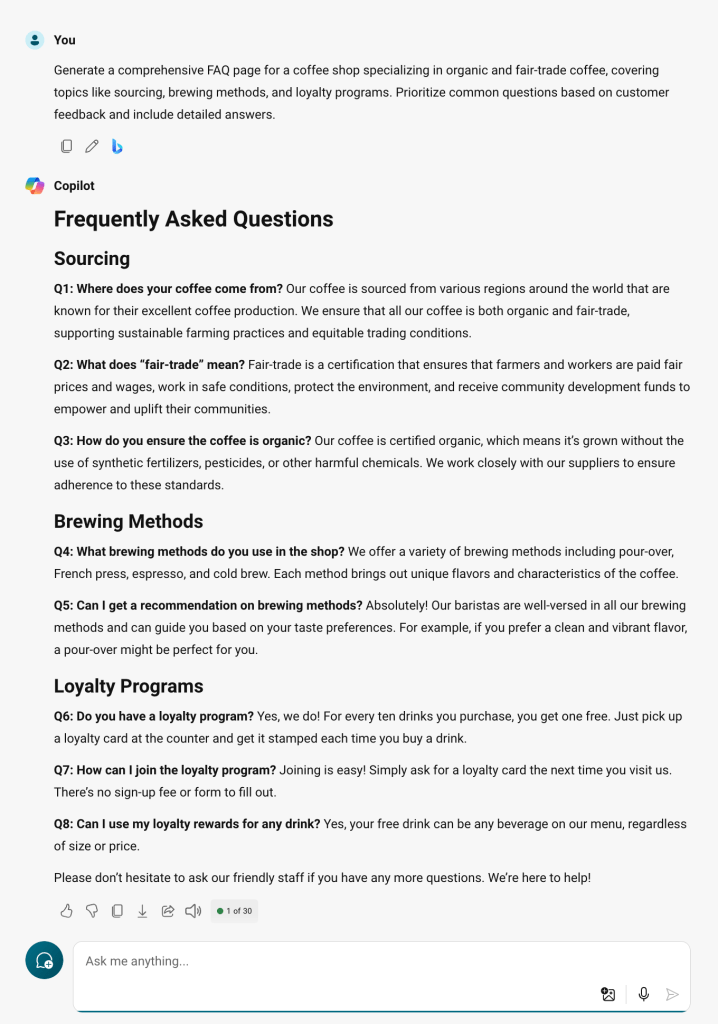
Example Prompts:
Good: Generate a comprehensive FAQ page for a tech startup.
Better: Generate a comprehensive FAQ page for a tech startup offering cloud storage solutions.
Best: Generate a comprehensive FAQ page for a tech startup offering cloud storage solutions, covering topics like security, pricing plans, and data recovery. Prioritize common questions based on customer feedback and include detailed answers.
How and Why It Works
Effective prompts provide Copilot for Security with the necessary parameters to generate valuable responses. This approach ensures that the generated FAQ page is both comprehensive and relevant. Here’s why and how this prompt works:
- Goal: The prompt specifies the goal of creating a comprehensive FAQ page. By clearly stating that the FAQ should prioritize common questions based on customer feedback, it sets a clear objective for the generated content.
- Context: Including the context of customer feedback helps tailor the FAQ page to address the most pressing concerns of your audience. This ensures the information provided is relevant and useful to your customers.
- Expectations: The prompt outlines the expectation of including detailed answers. This helps guide the response to be thorough and informative, ensuring that customers receive the detailed information they need.
- Source: By drawing on customer feedback, the prompt leverages known information to create a more accurate and relevant FAQ page. This makes the FAQ page more effective in addressing common queries.
Learn about Copilot prompts – Microsoft Support
What’s In It For Me (WIIFM)?
Using this template to generate your FAQ page offers several benefits:
- Efficiency: Save time by addressing common queries upfront, reducing repetitive customer support interactions.
- Customer Satisfaction: Provide clear, concise, and accurate information, improving the overall customer experience.
- Brand Trust: Establish your business as a transparent and reliable source of information, fostering trust and loyalty.
- SEO Benefits: An FAQ page can improve your website’s search engine rankings by addressing common search queries related to your business, product, or service.
Edit a Copilot prompt to make it your own – Microsoft Support
Call to Action
Ready to create a stellar FAQ page that enhances your customer support and boosts satisfaction? Use this prompt template to get started. Experiment with different variations to find the best fit for your company, product, or service. By prioritizing customer feedback and providing detailed answers, you’ll create an invaluable resource for both your customers and your support team.
 Upskill Tech
Leave a comment